You can go anywhere in Tokyo with only a short walk at either end.

Subways and trains are used by everyone from schoolchildren to corporate bosses because they’re by far the best way to get around Tokyo. Taking a taxi is expensive and slow because Tokyo is huge and the streets are usually choked with traffic. You don’t want to waste half your trip sitting in it.
•
There are two kinds of train systems, but
you can use the same pre-loaded transit card for all of them:
• Subway “Metro” system: underground trains, just like subways everywhere.
• Japan Rail “JR”: elevated trains
The best thing to do is to buy a reloadable transit card that automatically debits the right amount. There are two kinds of cards: Suica cards and PASMO cards. They are issued by different companies, but both can be used on any train system and you can add fare to either card at any ticket machine.
Important note: As of August 2023, you can still buy ICOCA transit cards at any train station in western Japan (Osaka/Kyoto and points west) but they stopped selling Suica and PASMO cards in Tokyo because of a chip shortage.
As a Tokyo visitor, there are two ways you can still get a transit card: 1) Buy a Suica “Welcome” or PASMO “Passport” transit card at the airport when you arrive or 2) Load a Suica or PASMO transit card into Apple Wallet on your phone. (Sorry Android users—it only works on Android phones bought in Japan. You need to buy a visitor transit card at the airport.) Here’s how…
Two ways to get a transit card:
1: Buy an actual physical card: It’s plastic, like a debit card, and you can reload (cash only) at the ticket machines at any station when it runs low.
If you have an Android phone bought outside of Japan, this is your only option as of August 2023.
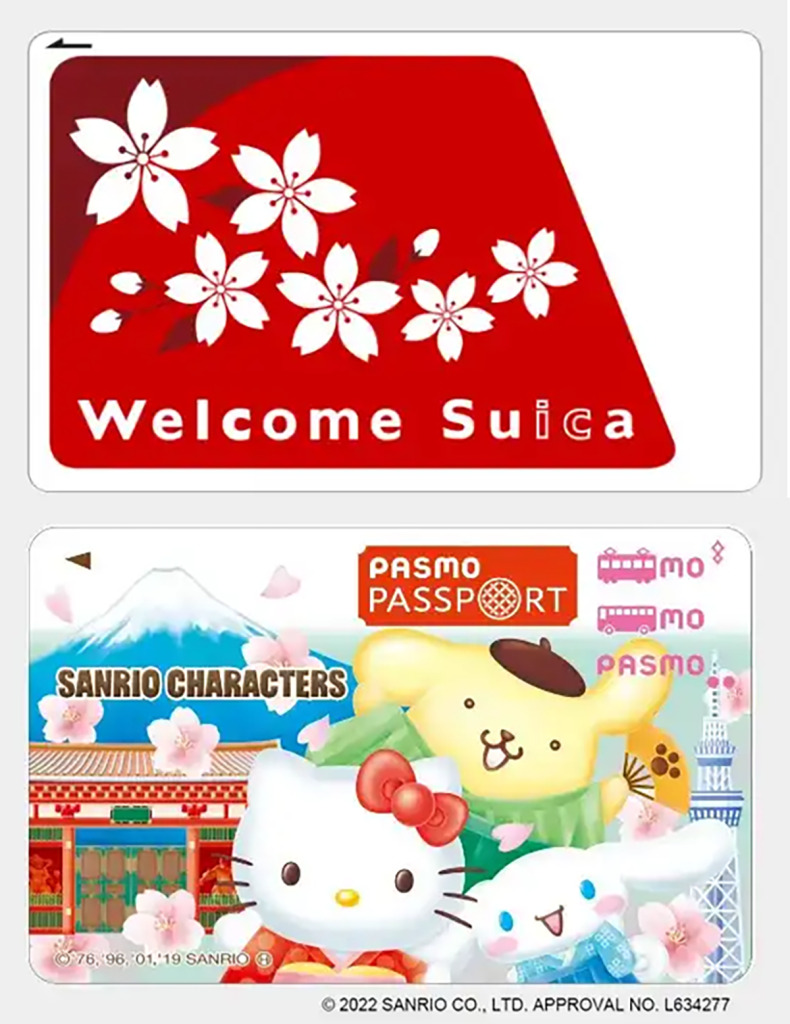
Card pros:
• Easy to recharge at ticket machines everywhere
• If you lose your phone, you can still get around
Card cons:
• Only sold at airports
• Have to stand in line at ticket counters or use special ticket machines at the airport that (at time of writing) do not take foreign credit cards, so you have to use cash
• Must be reloaded with cash (not credit card) at a train station ticket machine
• Expire after one month so you can’t reuse it on your next trip
2: Put a virtual card on your phone: These work the same way as physical cards at the ticket gate (hover it over the sensor) and you can reload from the credit card stored on your phone

Phone pros:
• Can set it up on your phone anytime, even before you go
• No standing in line to get it
• Don’t need to use the ticket machine at stations to recharge
• Will work even if your phone is off/dead
• Can recharge with your foreign credit card
Phone cons:
• VISA credit/debit cards issued by foreign banks are not accepted. You have to use MasterCard or AmEx (which is a nuisance every time you want to add more money if your default card is a VISA)
• If your phone is dead, you can’t add more money to your card
Information about where to buy and how to reload each type is also on the link
Using your card:
You go through an electronic ticket gate when you enter and exit the system. You need your transit card to enter the platform and get out the gate at your destination because you are charged by the distance traveled and train lines used.
• Tap it on the sensor on the front of the ticket gate that says “Suica” or “Pasmo” and when you hear the beep, walk through. This works even if the card is inside your wallet or your phone is turned off.
• Choose the platform that will take you to your destination. (Your phone navigation app should tell you the name of the station that is the last stop in the direction you’re going). Above the stairs leading to the platform or somewhere near the end of the platform stairs will be a map of the subway stops serviced by the trains that stop at that platform. If you don’t see your destination on the map, cross over to the platform on the other side of the tracks.
• When you exit at your destination, tap/hover your card on the sensor at the ticket gate and it will let you through, automatically debiting the proper amount from your card.
How to tell how much money is left on your card:
After you tap your card on any sensor as you enter or exit a station, check the lighted display on the right side of the ticket gate as you walk through. The amount left on your card will be displayed.
What if there isn’t enough money left on my card to exit?
If this happens, a loud noise will sound, the sensor will flash red, and the gate will snap closed in front of you.
If it does, back up and find the bright yellow “Add Fare” machines near the exit. Feed your card into the slot and select “English,” then follow the directions on the screen OR add more money to the card on your phone from the wallet app. If none of that works, go to the ticket agent at the window at the end of the main bank of ticket gates. The station staff will ask you where you got on and figure out how much cash you owe and fix your card for you.
How to figure out where you’re going

You can do it the old-fashioned way by carrying a paper map or consulting the map on the wall at the station, but by far the fastest and easiest way is to use a phone app.
*The JR Line also runs long distance trains like the “bullet train,” but you’ can’t ride those trains with transit card. Here’s how to get a ticket for those trains.
Get more Japanese goodness straight from the source!
Subscribe to my monthly Japanagram e-magazine・° ♪・☆ It’s free!


Japanese Home Cooking recipes • Beyond Tokyo travel destinations • Seasonal Secret shopping & events • The Thing I Learned Today • Why, Japan, Why? • Monthly book or J-swag giveaway
•

Jonelle Patrick writes novels set in Japan, produces the monthly e-magazine Japanagram, and blogs at Only In Japan and The Tokyo Guide I Wish I’d Had
 Jonelle Patrick writes about Japan